Discharge Propagation Tracking#
Tracking the propagation of discharges is one of the more difficult tasks to complete with the GUI. Given the complexity of the task, it may take the user some time to become familiar with the process.
Note
This tool assumes you’ve already completed a full analysis run and have detected seizure-like events (SLEs).
Introduction#
Before starting, it is important to understand what the discharge propagation tracking algorithm is doing behind the scenes. This understanding will help the user better able to set and fine tune the parameters of the algorithm. Admittedly, the algorithm is not perfect and may require some manual intervention to get the best results.
The system detects each discharge event and uses the DBSCAN algorithm to cluster electrodes based on spatial recruitment.
There are two main steps to the discharge propagation tracking algorithm:
Discharge detection with a peak finding algorithm
Clustering of detected discharges with a DBSCAN algorithm
While seemingly simple, each step has its own set of parameters that can greatly affect the final results. With many different variables to consider and the nature of the data, it is difficult to provide a one-size-fits-all solution.
Warning
Noisy data greatly hinders the final results of the discharge propagation tracking algorithm.
Discharge Detection#
The discharge detection algorithm is based on a peak finding algorithm. The goal of the discharge detection algorithm is to place a marker just before the peak of a discharge event. Ideally, the marker will be placed at the point where the signal has the highest rate of change. This is done by finding the local maxima of the signal and then finding the “closest” point where the signal has the highest rate of change.
Before the discharge detection algorithm can be run, the user must set the following parameters found in the Peak Settings:
Peak Threshold: The number of standard deviations the mean after which a point may be considered a peak.
Min Distance Between Peaks: The minimum number of samples between peaks necessary to consider them separate events. This is useful to increase if the orange discharge markers are too close together.
SNR Threshold: The minimum signal-to-noise ratio threshold of an electrode necessary to consider a peak within the given electrode. This parameter is used to filter out entire channels that are too noisy or have small peaks. If the red/orange markers are not appearing for a channel, try lowering this value.
Note
The default values for the peak settings are a good starting point, but may need to be adjusted depending on the data.
With that brief explanation of the parameters, here is a step-by-step guide to the workflow of the discharge detection algorithm:
View General Propagation Pattern: The algorithm works best when the user knows roughly where discharge events begin. This can be done by plotting the channel(s) of interest and looking for a general pattern of discharge events with the false color map. It is recommended to view a random sample of discharges to get a sense of the general pattern.
Plot Channel(s): Once the general pattern is known, plot (in the first trace plot) a channel where the general beginning of the discharge events seems consistent. This can be done by clicking the active channel in the MEA grid and then pressing
1. It is also useful to plot channels that occur later on the discharge propagation path.Note
It will become apparent later why it is important to plot the beginning of the discharge events in the first trace plot.
Turn on Peak Detection: With the channel(s) plotted, turn on the peak detection algorithm by pressing
f. This will plot the detected peaks/valleys in red and the discharge events in orange. You should see something like this:
Important
The current range of the trace plot will affect the peak detection algorithm (mainly the standard deviation calculation). It is recommended to adjust the peak find parameters with the range of the trace plot set to the region of interest.
Initial Test of Peak Finding Parameters: The goal at the end of all this is to have the orange markers placed at the beginning of discharge events. To get a good idea of how well the peak finding algorithm is working, go ahead and
left clickon a trace plot and selectFind discharges. This will run the peak finding algorithm on every active channel’s signal within the range specified by the current view. After a second or two, only orange markers should remain. These are now “fixed” and not dependent on the current view. The user may now zoom in and verify how well the default parameters did.Here is an example of a good set of found discharges:
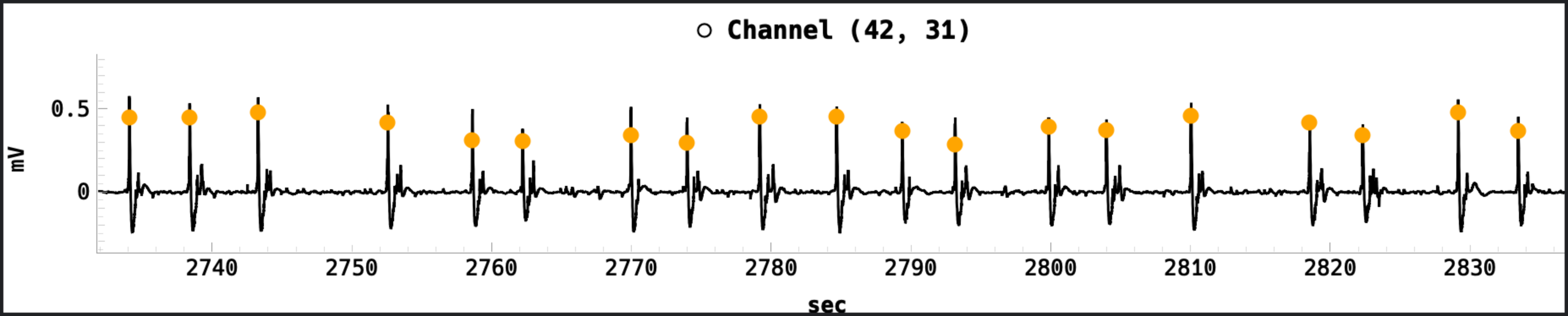
Here is a poor set of found discharges:
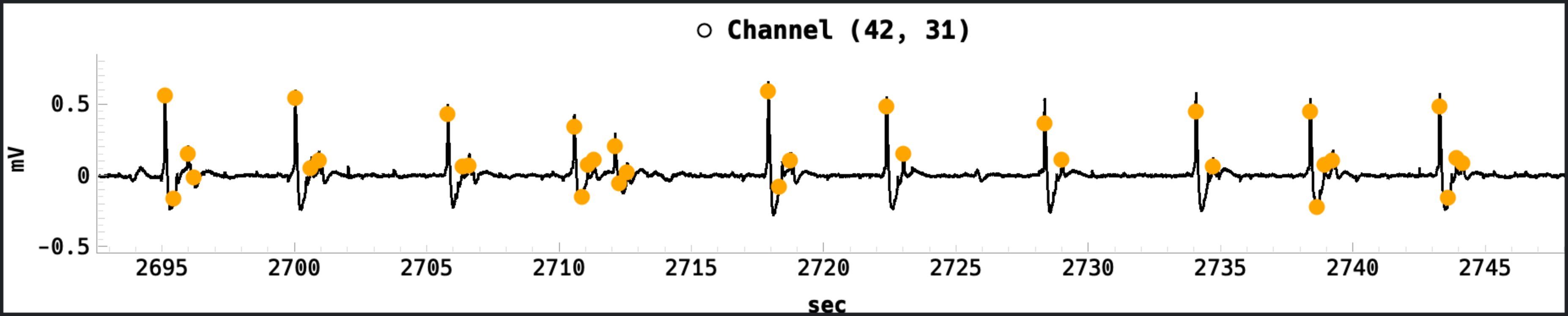
Fine Tune Peak Finding Parameters: This is arguably one of the most difficult part of the discharge propagation tracking algorithm. The user must adjust the peak finding parameters to get the best results. The user should also consider the following:
Peak Threshold: If the orange markers miss lower amplitude discharges, try lowering this value to capture more peaks. If the orange markers are too close together, try increasing this value to filter out smaller peaks.
Min Distance Between Peaks: If the orange markers are too close together, try increasing the min distance between peaks. If the orange markers are too far apart, try decreasing the min distance between peaks.
SNR Threshold: If the red/orange markers are not appearing for a channel, try lowering this value. If you want to filter out noisy channels that may skew discharge tracking, try increasing this value.
Note
If only orange markers are appearing and now red markers, the discharges are already “found”. The user must right click on a trace plot and select
Clear dischargesto reset the markers and see the effect of the peak finding parameters.Repeat Steps 4 and 5: The user should repeat steps 4 and 5 until the orange markers are placed at the beginning of discharge events. This may take some time to get right.
At this point, the user should have a good set of orange markers placed at the beginning of discharge events. The next step is to cluster these markers to form a discharge event. This is done by the DBSCAN algorithm. Fine-tuning these parameters is even more difficult than above, so be patient with the tedious process.
Test Initial DBSCAN Parameters: The default DBSCAN parameters are a good starting point, but may need to be adjusted depending on the data. To test the DBSCAN parameters, zoom in on a single discharge peak and place the playhead just before the discharge event. Now, turn on Discharge Paths from the View option in the menubar. Hopefully, as the user taps
right arrowand the playhead goes over the discharge marker, acentroidshould appear and follow the path of the seizure like so: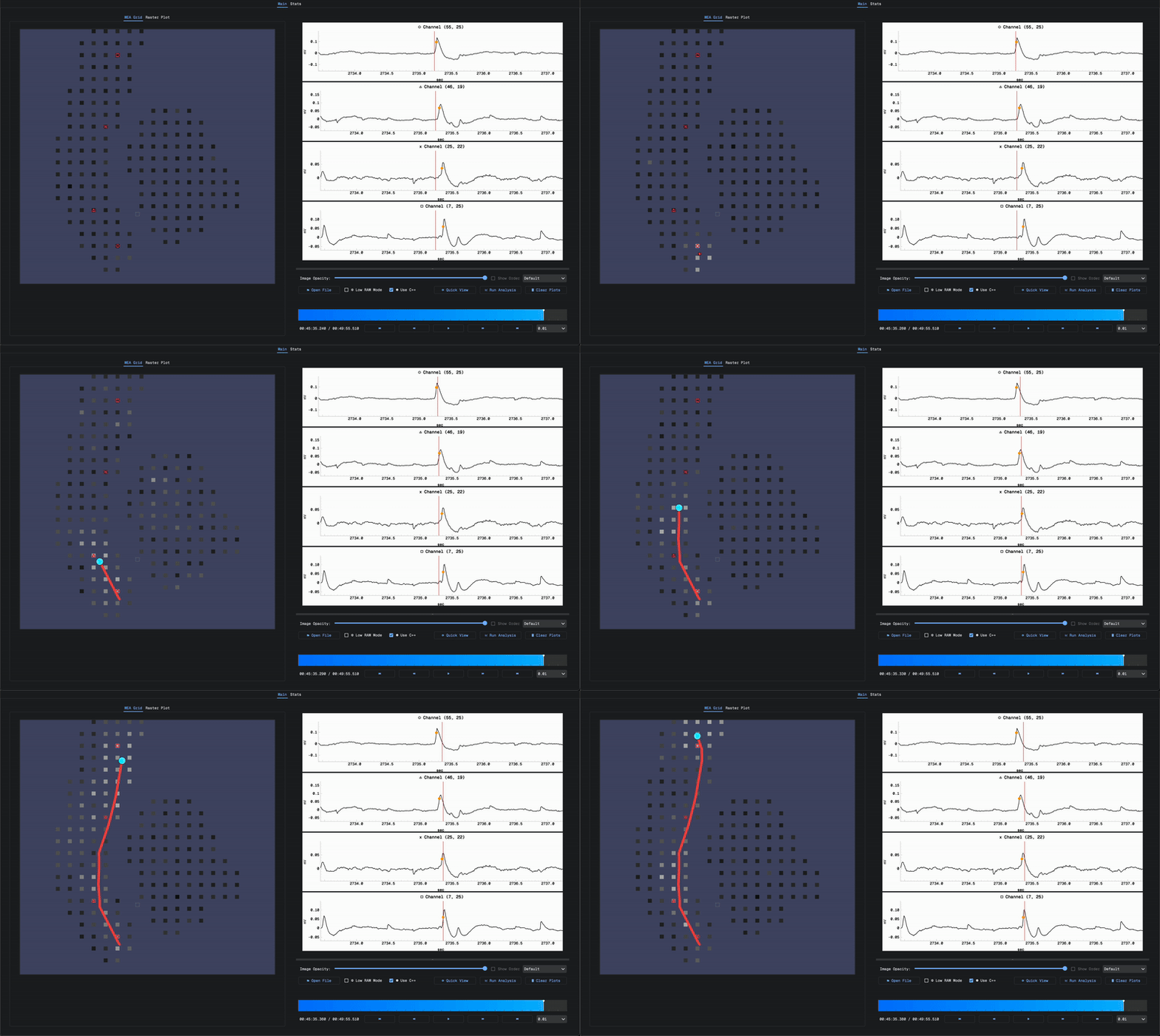
Fine Tune DBSCAN Parameters: The user should adjust the DBSCAN parameters to get the best results. The user should consider the following:
Epsilon: The maximum distance between two samples for one to be considered as in the neighborhood of the other. If the centroids are not following the path of the seizure, try increasing this value. If the centroids are following the path of the seizure too closely, try decreasing this value. For example:
Min Samples: The number of samples in a neighborhood for a point to be considered as a core point. If the centroids are not following the path of the seizure, try increasing this value. If the centroids are following the path of the seizure too closely, try decreasing this value.
Max Distance: The maximum distance a discharge centroid can travel between consecutive frames. This is useful for tracking the propagation of the discharges.
Bin Size: The bin size for calculating the false color map on the MEA grid. This is useful for tracking the propagation of the discharges because the centroids are calculated from electrodes that currently have a discharge event marker within the bin window. The default value is good for most cases.